Vivitar True Wireless Earbuds Review 2026: Budget Buds Worth Buying?
Looking for wireless earbuds that fit a tight budget? The Vivitar True Wireless Earbuds keep popping up at stores like Five Below, Walmart, and Office Depot.
They cost less than most fast food meals. But cheap does not always mean good. I tested these earbuds for two weeks. I wanted to know if they hold up for daily use.
This review covers sound, comfort, battery, and build quality. You will get clear answers before you spend your money. Keep reading to find out if these pocketfriendly buds belong in your bag.
In a Nutshell
- Price point: The Vivitar earbuds sit in the ultra budget range, usually under 20 dollars. They beat most competitors on cost alone.
- Battery life: You get around 4 hours per charge with the buds. The case adds two extra full charges for about 18 to 20 hours total.
- Sound quality: The audio is clear for calls and podcasts. Bass feels light, and the treble can sound sharp at high volume.
- Connectivity: Bluetooth 5.0 gives you a stable link within 30 feet. Auto pairing makes setup easy for new users.
- Build and fit: The earbuds feel light. The plastic shell looks basic. Touch controls work but need a firm tap.
- Best for: Casual listeners, kids, gym backups, or gifts. Audiophiles should skip and look at the alternatives below.
What Are Vivitar True Wireless Earbuds?
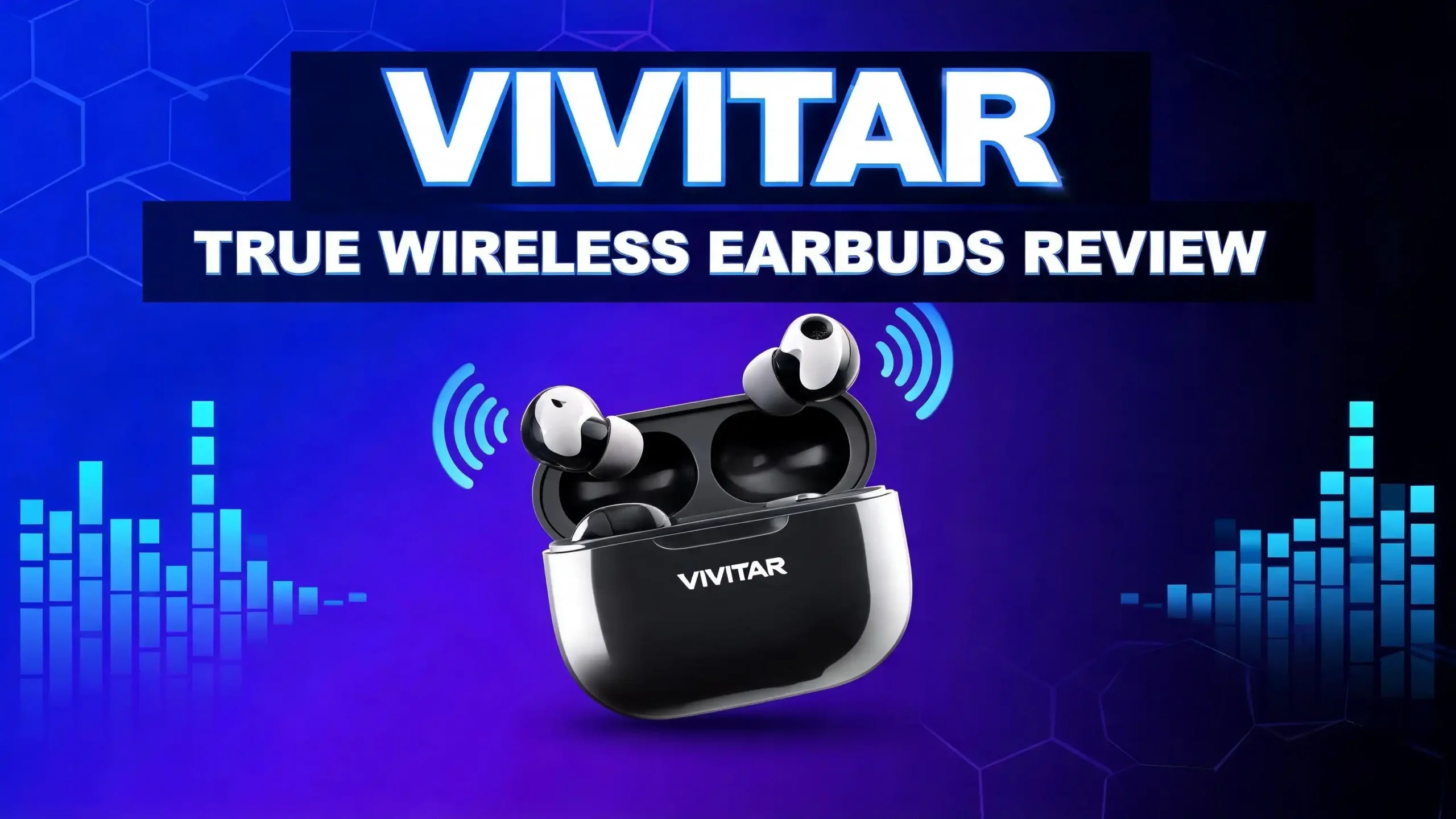
Vivitar is an old camera brand that now makes tech accessories. Their True Wireless Earbuds are small Bluetooth buds that come with a charging case. You will find them at big box stores and online retailers. The model number varies, but the core design stays the same across colors.
These earbuds use Bluetooth 5.0 for a wireless connection. They pair to your phone, tablet, or laptop without cables. The buds sit inside your ear canal with silicone tips. Each bud weighs only a few grams.
The brand markets them as everyday earbuds for music, calls, and videos. They include a built in microphone for hands free chats. Touch sensors on each bud control playback. You can skip songs, pause music, and answer calls with a tap. Vivitar aims this product at people who want a simple, affordable option without extra features.

- Use these true wireless earbuds to listen to podcasts, talk on the phone and more. The Vivitar Bluetooth...
- Touch controls allow simple use.
Last update on 2026-10-01 / Affiliate links / Images from Amazon Product Advertising API
Design and Build Quality
The Vivitar True Wireless Earbuds look clean and simple. The buds come in black, white, and sometimes pastel shades. The case is small enough to fit any pocket. It has a glossy plastic finish that picks up fingerprints fast.
The earbuds use a stem design similar to AirPods. Each bud has a small touch panel on the outside. The build feels lightweight. You can wear them for hours without ear fatigue. The plastic shell does not feel premium, but it holds up to daily use.
The charging case opens with a flip lid. Inside, you see two LED dots that show pairing status. A single LED on the front shows case battery level. The case charges through a Micro USB or USB C port, depending on the version. Older models still ship with Micro USB cables.
I dropped the case from waist height on tile. It survived without cracks. The hinge feels a bit loose after a week. Overall, the build matches the price.
Sound Quality and Audio Performance
Sound is where budget buds usually fall short. The Vivitar True Wireless Earbuds give you acceptable audio for the price. The mids come through clean. Vocals in podcasts sound natural and easy to follow.
Bass is the weak spot. You hear it, but it lacks punch. Hip hop and EDM tracks lose some impact without that low end thump. Pop, rock, and acoustic music sound better. The treble can get sharp on cymbals if you push the volume past 80 percent.
These earbuds do not support advanced codecs like aptX or LDAC. You get the basic SBC codec. That means small audio delays during videos and games. Movies on Netflix sync fine. Fast paced shooter games show noticeable lag between action and sound.
For phone calls, the microphone works well in quiet rooms. Outdoor calls pick up wind and traffic noise. People on the other end said my voice sounded a bit muffled. This is normal for buds at this price.
Battery Life and Charging
Battery life on the Vivitar True Wireless Earbuds is modest but fair. Each bud holds about 4 hours of playback on a single charge. The charging case stores enough power for two extra full charges. That gives you roughly 18 to 20 hours of total listening time.
I tested the buds at 60 percent volume. They lasted close to 3 hours and 45 minutes before dying. Higher volume cut the time to about 3 hours. Lower volume pushed it past 4 hours.
The case takes around 2 hours to recharge fully. The buds themselves charge in about 90 minutes inside the case. There is no fast charging support. You also cannot wirelessly charge the case.
For commuters and gym goers, this battery life works fine. You can use them through a workout and still have power left. Heavy users who listen all day will need to recharge the case often. Keep the cable handy if you travel.
Top 3 Alternatives for Vivitar True Wireless Earbuds
If the Vivitar buds do not meet your needs, these three options give you more features for a small price bump. Each one beats the Vivitar in at least one area.

- 🎶AUTO ON & CONNECT: The Go Pop+ True Wireless earbuds turn on and connect to each other automatically...
- 🤏 SMALLER FIT EARBUDS: Smaller than a credit card, the Go Pop+ buds case fits in your pocket and the...
Last update on 2026-10-01 / Affiliate links / Images from Amazon Product Advertising API

- [Immersive Sound with OrigX Acoustics] Powered by TOZO OrigX 2.0 acoustic tuning and an advanced 8 mm...
- [Comfortable Ergonomic Fit for All Day Wear] The lightweight ergonomic design follows the natural shape...
Last update on 2026-10-01 / Affiliate links / Images from Amazon Product Advertising API

- Powerful Bass: soundcore P20i true wireless earbuds have oversized 10mm drivers that deliver powerful...
- Personalized Listening Experience: Use the soundcore app to customize the controls and choose from 22 EQ...
Last update on 2026-10-01 / Affiliate links / Images from Amazon Product Advertising API
The JLab Go Air Pop+ offers longer battery life and better sound tuning. The TOZO T10 adds IPX8 waterproofing and a wireless charging case. The Anker Soundcore P20i brings a companion app with custom EQ settings. All three cost a little more but deliver clear upgrades.
Connectivity and Bluetooth Performance
The Vivitar True Wireless Earbuds use Bluetooth 5.0. This version gives a stable link with low power use. Pairing takes a few seconds the first time. After that, the buds connect to your phone the moment you open the case.
Range is solid for the price. I walked about 30 feet from my phone before the audio cut out. Walls reduce that range to around 20 feet. The signal stayed steady during walks, cooking, and gym sessions.
Auto pairing between the two buds works most of the time. Sometimes one bud connects faster than the other. A quick reset by holding both touch panels fixes this issue. The manual explains the reset steps in plain language.
You can only pair to one device at a time. The buds do not support multipoint connection. If you switch between a phone and a laptop, you have to disconnect first. This is a minor flaw for people who use one device.
Comfort and Fit
Comfort matters more than specs when you wear earbuds for hours. The Vivitar True Wireless Earbuds feel light inside the ear. Each bud weighs about 4 grams. You may forget you have them on after a few minutes.
The package includes three silicone tip sizes: small, medium, and large. Most users will find a fit that works. I used the medium tips for a snug seal. The bass response also improves with the right tip size.
The stem design rests outside the ear. This helps with quick removal. Long hair can catch on the stems, so be careful when you pull them out. Glasses wearers should have no problem since the buds do not press against frames.
For workouts, the fit holds up to light jogging and lifting. Sprints and burpees can shake them loose. Vivitar does not list an IP rating, so I avoided heavy sweat sessions. These work best for casual gym use or daily commutes.
Touch Controls and Voice Assistant
Touch controls let you skip cables and buttons. The Vivitar buds use a flat panel on each stem. A single tap, double tap, or long press triggers different actions. You can pause music, change tracks, answer calls, and call up your voice assistant.
The controls work, but they need a firm tap. Light touches sometimes do nothing. Strong taps can push the bud deeper into your ear, which gets annoying. After a week, I learned the right pressure. Muscle memory makes it easier over time.
The voice assistant feature connects to Siri or Google Assistant. A long press on either bud wakes the assistant on your phone. You can ask for the weather, send texts, or start a song. The microphone picks up your voice well in quiet places.
There is no app for custom controls. You cannot change the tap actions. What you get is what you keep. This is fine for simple users but limits power users who want more control.
Microphone and Call Quality
Many cheap earbuds drop the ball on calls. The Vivitar True Wireless Earbuds do okay but not great. The microphone sits inside the stem near your mouth. Indoor calls come through clear to the person you are speaking with.
Background noise is the main issue. The buds lack active noise cancellation on the mic. Wind, traffic, and crowds bleed into your voice. Friends told me my calls sounded muffled outside.
For Zoom meetings at home, the mic works fine. For business calls on the go, you may want to look elsewhere. The TOZO T10 and Anker P20i offer better mic performance for a small price bump.
You can also use just one earbud for calls. Pop one out and the other still works. This is helpful when you want to stay aware of your surroundings. The mono call mode connects automatically when you remove one bud.
Who Should Buy Vivitar True Wireless Earbuds
These earbuds fit a clear group of buyers. If you match any of these, the Vivitar buds make sense.
First time wireless users will like the simple setup. There are no apps, no menus, and no extra steps. Open the case, pair once, and listen. This makes them great for older parents or grandparents.
Kids and teens can use these as a starter pair. The low price means you will not panic if they get lost. School commutes and casual music sessions work fine with these buds.
Gym backups make sense too. If your main earbuds die at the gym, the Vivitar buds fill the gap. They cost less than a pizza and do the job for short workouts.
People who want premium audio should skip these. Audiophiles, gamers, and frequent callers need better gear. The buds work as a secondary pair or a temporary fix while you save for something better.
Pros and Cons of Vivitar True Wireless Earbuds
Every product has strengths and weak spots. Here is a clear breakdown of what the Vivitar True Wireless Earbuds do well and where they fall short.
The pros include: very low price, easy pairing, light comfortable fit, decent call clarity in quiet rooms, and a compact case that fits in any pocket. The buds also give you touch controls and voice assistant support, which is impressive for the price.
The cons include: weak bass response, no IP water rating listed, no app or custom EQ, no fast charging, no multipoint pairing, and a microphone that struggles in windy or loud places. The Micro USB charging port on older models also feels outdated in 2026.
Overall, the pros outweigh the cons if you set the right expectations. These are budget earbuds, not flagship buds. Buy them for what they are. You will get fair value without regret.
Price and Value for Money
The Vivitar True Wireless Earbuds usually sell between 10 and 20 dollars. You can find them at Five Below, Walmart, Office Depot, and Amazon. Sales and clearance events can push the price even lower.
At this cost, the value is hard to beat. You get true wireless freedom, a charging case, and decent sound. Compare that to wired earbuds at the same price, and you see the appeal.
The catch is longevity. Cheap buds often fail within a year. Touch panels can stop working. Batteries can lose capacity. Cases can crack. You should expect about 12 to 18 months of normal use before issues show up.
If you spend 30 to 50 dollars instead, you get better build, longer warranty support, and stronger features. The Anker, JLab, and TOZO options listed above all offer more for a small jump in price. But if 15 dollars is your hard limit, the Vivitar buds deliver real value.
Final Verdict on Vivitar True Wireless Earbuds 2026
The Vivitar True Wireless Earbuds do what they promise. They give you wireless audio at a price almost anyone can afford. The sound is fine for casual listening. The fit is comfy. The battery covers a workday with one case top off.
They will not replace your premium earbuds. The bass feels thin. The mic struggles outside. There is no waterproofing or app support. These are clear trade offs for the low price.
I give them a 6 out of 10. They are a safe pick for kids, gifts, and backup pairs. For serious daily use, spend a bit more on the alternatives I listed above. Either way, you now know what to expect before you click buy.
If you only need basic earbuds and you hate spending big on tech, these get the job done. Match your needs to the product, and you will walk away happy.
Frequently Asked Questions
Are Vivitar True Wireless Earbuds waterproof?
Vivitar does not list an official IP rating for most of their true wireless models. The buds can handle light sweat and a few drops of rain. Do not swim, shower, or wash them with water. For waterproof workouts, the TOZO T10 with IPX8 protection is a safer choice.
How long do Vivitar earbuds last on a single charge?
Each earbud lasts about 4 hours on a single charge at moderate volume. The charging case adds two more full charges. That gives you a total of 18 to 20 hours of playtime before you need to plug in the case.
Do Vivitar True Wireless Earbuds work with iPhone and Android?
Yes, the Vivitar buds work with both iPhone and Android devices. They use Bluetooth 5.0, which is supported by almost every modern phone, tablet, and laptop. Pairing is simple and only takes a few seconds the first time.
Can I use just one Vivitar earbud at a time?
Yes, you can use a single bud while the other charges in the case. This mono mode is helpful for calls, audiobooks, or staying aware of your surroundings. The audio plays in one ear without any extra setup.
How do I reset Vivitar True Wireless Earbuds?
Put both buds in the case and leave it open. Press and hold both touch panels for about 10 seconds. The LED lights will flash to confirm the reset. Then pair them again from your phone Bluetooth menu. This fixes most pairing issues.
Are Vivitar earbuds good for working out?
They work for light workouts like walking, cycling, or basic gym sessions. The fit holds during jogging but may loosen during sprints or jumps. Since there is no official water rating, avoid heavy sweat or rain. For serious athletes, look at IPX rated buds instead.
Is there a warranty on Vivitar True Wireless Earbuds?
Vivitar offers a limited one year warranty on most of their wireless audio products. The warranty covers defects in materials and workmanship. It does not cover damage from drops, water, or normal wear. Keep your receipt to file a claim if needed.

Hi, I’m Joy! I’m a passionate tech enthusiast with years of experience testing and reviewing the latest gadgets and software. I started TechReviewed.blog because I believe everyone deserves access to honest, straightforward tech advice without the marketing fluff.