HP Color LaserJet Pro MFP 4301fdw Review 2026: Is This Worth It?
Are you looking for a color laser printer that can handle printing, scanning, copying, and faxing without taking up half your desk?
The HP Color LaserJet Pro MFP 4301fdw has been a popular pick for small offices and home workspaces since its launch. But does it still hold up in 2026?
In this review, we break down everything you need to know. We cover speed, print quality, paper handling, connectivity, running costs, and more. By the end, you will know if this HP all-in-one deserves a spot in your office or if a better option exists.
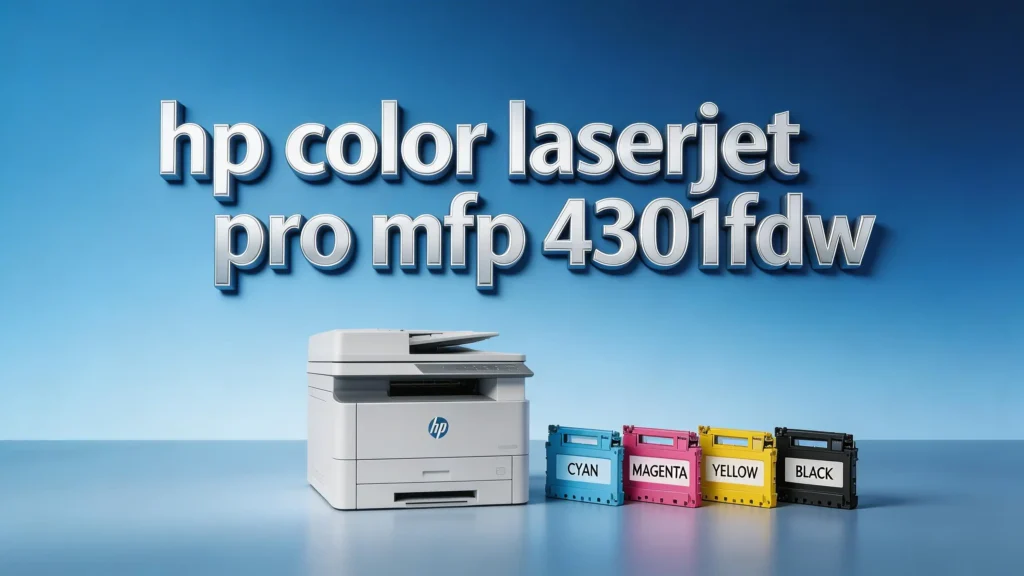
Key Takeaways
- Print speed is impressive. The HP 4301fdw delivers up to 35 pages per minute in both black and color. Real-world testing shows it hits close to its rated speed, clocking in at 36 ppm for single-sided text documents. This makes it one of the faster options in its price range.
- Print quality is excellent across the board. Text comes out sharp and clear, even at small font sizes. Color graphics look vibrant with smooth gradients. Photos are solid for a laser printer, with accurate colors and good contrast.
- The footprint is surprisingly small. At just 15.1 x 16.6 x 17.1 inches, this all-in-one printer fits on most desks without much trouble. It weighs about 45 pounds, which is lighter than many competitors.
- Running costs are a weak spot. Color pages cost about 14.1 cents each with high-yield toner. Black-and-white pages cost about 2.3 cents each. These numbers are higher than some rivals like the Brother MFC-L9570CDW.
- Connectivity options are generous. You get USB 2.0, Gigabit Ethernet, dual-band Wi-Fi, Wi-Fi Direct, Apple AirPrint, and Mopria. The HP Smart App adds extra features like phone-based faxing and one-touch shortcuts.
- Paper capacity starts at 300 sheets (250-sheet tray + 50-sheet multipurpose tray) and can expand to 850 sheets with an optional 550-sheet tray. The 50-sheet auto-duplexing ADF handles multi-page scan and copy jobs with ease.
HP Color LaserJet Pro MFP 4301fdw Overview

- EVERYTHING SMALL TEAMS NEED – Print, scan and copy professional-quality color documents and reports...
- BLAZING FAST COLOR – Up to 35 color pages per minute, with sharp details and incredible color

Last update on 2026-10-22 / Affiliate links / Images from Amazon Product Advertising API
The HP Color LaserJet Pro MFP 4301fdw is a four-in-one color laser printer. It prints, scans, copies, and faxes. HP designed it for small to midsize offices and workgroups of 3 to 10 people.
This printer carries a list price of around $699. However, you can often find it discounted to around $529 or less at major retailers. At that price point, it competes directly with models from Brother and Canon.
HP rates the monthly duty cycle at 50,000 pages. The recommended monthly print volume sits between 750 and 4,000 pages. This makes it a solid fit for offices with moderate printing needs.
Design and Build Quality
The 4301fdw has a clean, modern look. The white and blue color scheme blends well in most office settings. HP kept the dimensions compact at 15.1 x 16.6 x 17.1 inches. This is smaller than many competing all-in-one laser printers.
The unit weighs around 45 pounds. That is lighter than the Brother MFC-L3770CDW at 53.9 pounds and the Canon Color imageClass MF746Cdw at 64 pounds. The lighter weight does make it easier to move, though some heavier printers may offer better internal durability.
Build quality feels solid overall. The paper trays slide in and out smoothly. The flatbed scanner lid lifts with a firm hinge. The ADF feels sturdy enough for regular office use.
Print Speed and Performance
Speed is one of the biggest strengths of this printer. HP rates it at 35 pages per minute for both black and color output. In real-world testing, it hit 36 ppm for simplex text printing and about 32.9 ppm for duplex.
These numbers beat the older HP M479fdw (31.4 ppm) and the Canon MF746Cdw (28.7 ppm). The Brother MFC-L9570CDW matched it closely at 36.7 ppm, but that model costs significantly more.
For business documents with charts and graphs, the 4301fdw scored about 17.2 ppm. Photo printing averaged about 9 seconds per 4×6 image. Text document printing is where this printer truly shines.
Print Quality Analysis
The HP 4301fdw produces near-typesetter-quality text. Popular fonts remain clearly readable down to 4-point size. This level of clarity works well for contracts, reports, and professional correspondence.
Color output is equally impressive. Charts and graphs come out with bright, vibrant colors and smooth gradients. Dark fills appear uniform across the page. PowerPoint handouts and marketing materials look clean and polished.
Photo prints show accurate color reproduction and a pleasing level of contrast. Laser printers cannot print borderless pages like inkjets. Still, the photo quality here works great for brochures, newsletters, and real estate flyers.
Top 3 Alternatives for HP Color LaserJet Pro MFP 4301fdw

- Best for Small Businesses: The Brother MFC L3780CDW small business printer is a wireless multi-function...
- AMPLIFY YOUR PROFESSIONAL DOCUMENTS. This Brother laser printer provides the consistent performance of...
Last update on 2026-10-23 / Affiliate links / Images from Amazon Product Advertising API

- Wireless 4-in-1 (print, scan, copy, fax)
- 2-sided print up to 35 pages per minute (bw / color, letter)
Last update on 2026-10-12 / Affiliate links / Images from Amazon Product Advertising API

Last update on 2026-10-22 / Affiliate links / Images from Amazon Product Advertising API
Paper Handling and Capacity
The 4301fdw comes with a 250-sheet main input tray and a 50-sheet multipurpose tray. This gives you a standard capacity of 300 sheets. A 150-sheet output bin sits on top.
For scanning and copying multi-page documents, the 50-sheet auto-duplexing ADF scans both sides in a single pass. This saves time on large scan jobs and two-sided copying tasks.
If 300 sheets is not enough, you can add an optional 550-sheet tray for about $199. This expands total capacity to 850 sheets. The extra tray attaches to the bottom of the printer and adds about 5 inches of height.
Control Panel and User Interface
A 4.3-inch color touchscreen sits on the right side of the printer. The display is bright and responsive. HP uses color-coded icons that are easy to understand and logically arranged.
The interface makes walk-up tasks simple. You can start a copy, scan, or fax job directly from the control panel without needing a computer. A USB thumb-drive port on the left side of the unit lets you print documents or scan files to a flash drive.
HP even added a dust-shield door over the USB port. This small detail helps keep the port clean and functional over time. The overall user experience feels polished and well thought out.
Connectivity and Mobile Printing
The 4301fdw offers a generous set of connectivity options. You get USB 2.0 for direct computer connection. Gigabit Ethernet provides fast wired network access. Dual-band 802.11ac Wi-Fi handles wireless printing from anywhere in the office.
Wi-Fi Direct lets you print from a device without connecting to a shared network. The printer also supports Apple AirPrint, Mopria, and HP ePrint for mobile printing from phones and tablets.
The HP Smart App deserves special mention. It lets you print photos, documents, and live camera captures from your phone. You can even send a fax through the app. The shortcut feature lets you create one-touch scripts for repetitive tasks like scanning to a specific folder.
Toner and Running Costs
Running costs are the main weakness of the HP 4301fdw. HP offers both standard-yield and high-yield toner cartridges. You should always opt for the high-yield versions to reduce your per-page costs.
With high-yield cartridges, expect to pay about 14.1 cents per color page and 2.3 cents per black-and-white page. These costs are competitive with some models but fall behind others.
For comparison, the Brother MFC-L9570CDW costs only about 7.5 cents per color page and 1.2 cents per monochrome page. The Canon MF746Cdw sits at about 13.3 cents for color. If you print thousands of color pages each month, the toner costs can add up quickly with the HP.
Security Features
HP includes Wolf Pro Security on the 4301fdw. This security suite provides automatic firmware updates and real-time threat detection. It helps protect against unauthorized access and data breaches.
The printer supports PIN-based secure printing. This means your documents stay in the print queue until you enter a PIN at the control panel. Sensitive files do not sit in the output tray where anyone can pick them up.
Network security features include IPsec, 802.1X authentication, and encrypted data transmission. These features matter for offices that handle confidential information. The 4301fdw takes security seriously and delivers enterprise-level protection at a midrange price.
Setup and Installation
Setting up the 4301fdw is straightforward. The HP Smart App guides you through the process step by step. It uses Bluetooth Low Energy (BLE) to discover the printer during initial setup.
You can connect via Wi-Fi, Ethernet, or USB. Most users will choose Wi-Fi for convenience. The dual-band support means fewer connection drops and better range in larger offices.
Driver installation on Windows and Mac is simple. HP provides current drivers through its website and the Smart App. The entire process from unboxing to first print usually takes about 15 to 20 minutes.
Noise Levels and Energy Efficiency
The 4301fdw runs at a reasonable noise level during printing. It produces about 49 decibels during active printing. This is quiet enough for a shared office space without causing major disruptions.
In standby mode, the printer is essentially silent. Energy Star certification confirms its efficient power usage. Auto-off and sleep mode features help reduce electricity costs during idle periods.
The printer uses a standard power supply and does not need any special electrical setup. It draws minimal power in sleep mode, making it a cost-effective choice for offices that leave the printer on throughout the workday.
Who Should Buy the HP Color LaserJet Pro MFP 4301fdw?
- EVERYTHING SMALL TEAMS NEED – Print, scan and copy professional-quality color documents and reports...
- BLAZING FAST COLOR – Up to 35 color pages per minute, with sharp details and incredible color
Last update on 2026-10-22 / Affiliate links / Images from Amazon Product Advertising API
This printer works best for small to midsize office teams that need reliable color printing, scanning, copying, and faxing. If your monthly volume sits between 750 and 4,000 pages, it fits well.
The 4301fdw is a strong choice if you value print speed and output quality over the lowest possible running costs. It also suits offices that need solid security features without paying for an enterprise-level machine.
However, if you print heavy color volumes every month, the toner costs may push you toward a competitor like the Brother MFC-L9570CDW. And if budget is your top priority, the Brother MFC-L3780CDW or Lexmark CX431adw may offer better value.
HP Color LaserJet Pro MFP 4301fdw: Pros and Cons
The pros are clear. Fast print speeds at 35 ppm. Excellent text and color print quality. Compact design that fits in tight spaces. A full set of connectivity options including Wi-Fi, Ethernet, and mobile printing. Strong security features with HP Wolf Pro.
The cons matter too. Running costs sit higher than some competitors, especially for color pages. The standard paper capacity of 300 sheets may require frequent refills for busy offices. The optional 550-sheet tray adds cost and height.
The 4.3-inch touchscreen is functional but smaller than what Canon and Brother offer on some models. Bluetooth support is limited to BLE for setup only. You cannot use Bluetooth for actual printing.
Final Verdict: Is It Worth Buying in 2026?
The HP Color LaserJet Pro MFP 4301fdw remains a solid all-in-one color laser printer in 2026. It delivers fast speeds, excellent print quality, and a full feature set at a competitive price, especially when discounted.
The main drawback is toner cost. If you print large volumes of color pages, consider models with lower per-page costs. But for moderate print volumes, the 4301fdw offers great overall value.
For small offices that need a reliable, fast, and feature-packed printer, this HP model is still easy to recommend. It balances performance, design, connectivity, and security in a way that few competitors match at this price point.
Frequently Asked Questions
What is the print speed of the HP Color LaserJet Pro MFP 4301fdw?
The HP 4301fdw is rated at 35 pages per minute for both black and color printing on letter-size paper. Real-world tests show it can reach about 36 ppm for single-sided text documents. Duplex printing speeds come in around 32.9 ppm.
Does the HP 4301fdw support wireless printing?
Yes. The printer supports dual-band 802.11ac Wi-Fi, Wi-Fi Direct, Apple AirPrint, Mopria, and HP ePrint. You can print from smartphones, tablets, laptops, and desktop computers. The HP Smart App adds extra wireless features like faxing from your phone.
How much does toner cost for the HP 4301fdw?
With high-yield toner cartridges, color pages cost about 14.1 cents each and black-and-white pages cost about 2.3 cents each. HP offers both standard and high-yield cartridge options. The high-yield cartridges provide better value per page.
Can I expand the paper capacity of the HP 4301fdw?
Yes. The standard capacity is 300 sheets (250-sheet tray + 50-sheet multipurpose tray). You can add an optional 550-sheet tray that brings the total capacity to 850 sheets. The extra tray costs about $199 and attaches to the bottom of the printer.
Is the HP 4301fdw good for photo printing?
The 4301fdw produces good-quality photo prints for a laser printer. Colors are accurate and contrast is pleasing. However, it cannot print borderless photos like an inkjet printer. It works well for brochures, flyers, and marketing materials that include photos.
How does the HP 4301fdw compare to the Brother MFC-L3780CDW?
The HP 4301fdw is faster at 35 ppm compared to the Brother’s 31 ppm. The HP also offers a larger standard paper capacity. However, the Brother MFC-L3780CDW typically costs less upfront and may have lower running costs depending on your usage. Both are excellent all-in-one printers for small offices.

Hi, I’m Joy! I’m a passionate tech enthusiast with years of experience testing and reviewing the latest gadgets and software. I started TechReviewed.blog because I believe everyone deserves access to honest, straightforward tech advice without the marketing fluff.