Lenovo ThinkPad T14 Gen 1 Review 2026: Is This Still Worth Buying?
The Lenovo ThinkPad T14 Gen 1 first arrived in 2020. Six years later, it still holds a strong spot in the used and refurbished laptop market. Many buyers want a reliable business laptop without paying a premium for the newest model. The T14 Gen 1 fits that goal well in 2026.
This review covers every angle you care about. We will look at design, performance, display, keyboard, ports, battery life, and real world value.
You will also see how it compares to fresh alternatives in the same price range. By the end, you will know if this older ThinkPad still earns a place on your desk.
In a Nutshell
- The ThinkPad T14 Gen 1 is a 14 inch business laptop with a strong magnesium and plastic chassis that still feels solid in 2026.
- The AMD Ryzen 7 Pro 4750U version offers better multi core power and longer battery life than the Intel 10th Gen models.
- The famous ThinkPad keyboard and TrackPoint stay best in class, even compared to newer machines.
- Refurbished prices now sit between $250 and $450, which makes it one of the best value business laptops on Amazon today.
- Ports are generous and include Thunderbolt 3 on Intel units, HDMI, USB A, and a full SD slot through the dock.
- The display and webcam are the weakest points, so a basic external monitor and webcam pair well with this machine.
Design and Build Quality

- Fresh install and activated Windows 11 with zero bloatware. Windows 11 will be activated via your unit's...
- Intel Quad Core i5 10th Generation 10310U (1.70 GHz)
Last update on 2026-10-22 / Affiliate links / Images from Amazon Product Advertising API
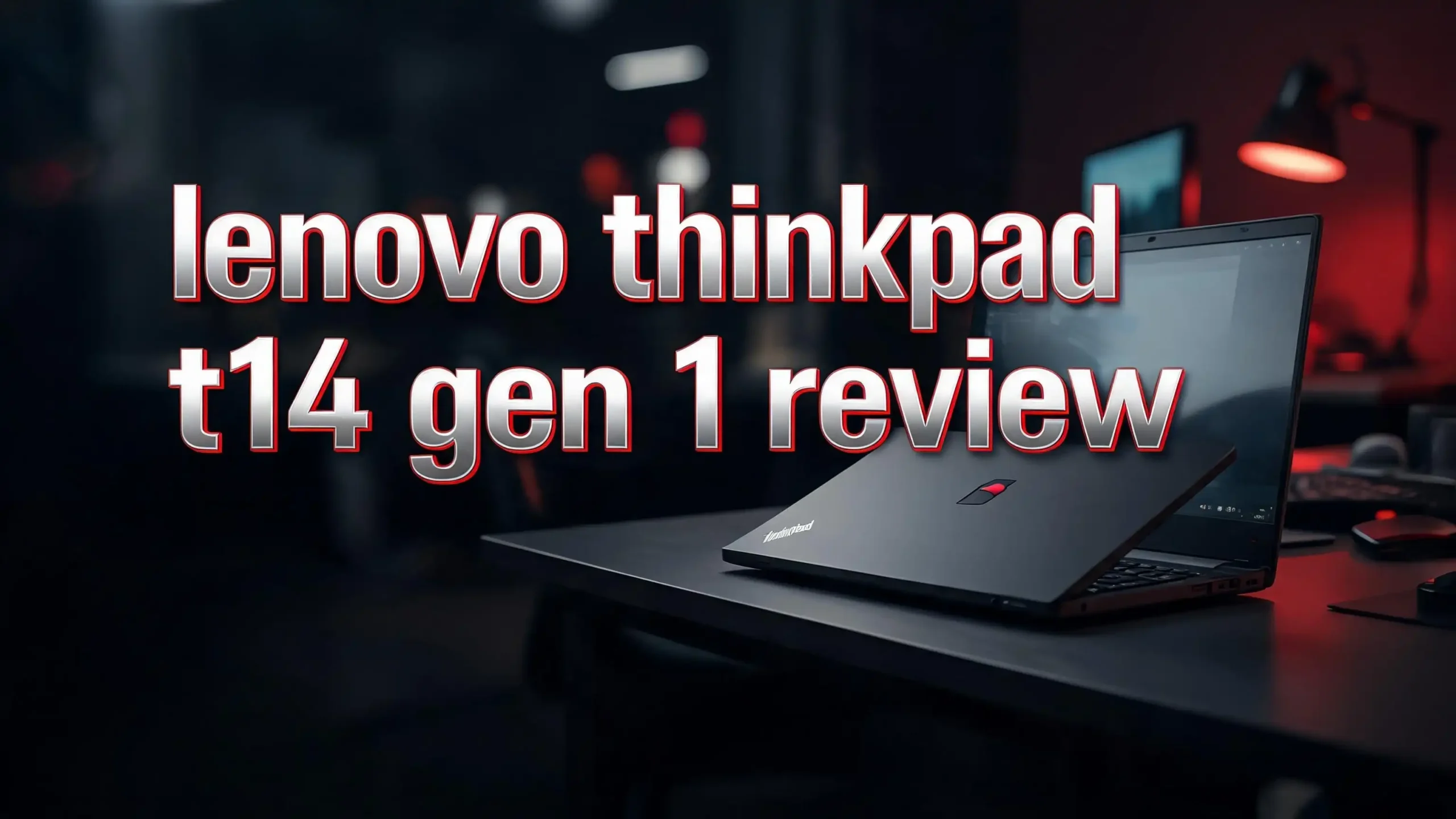
The ThinkPad T14 Gen 1 keeps the classic black box look. The lid uses a glass fiber reinforced plastic, while the bottom is magnesium alloy. The result is a laptop that feels tough but light at about 1.5 kg.
Lenovo tested this model against twelve MIL STD 810H standards. That means it can handle drops, dust, humidity, and shock better than most consumer laptops. The hinge stays firm after years of use, and the lid opens with one hand.
The chassis shows almost no flex when you press the keyboard deck. Many users on Reddit report buying these laptops used and finding them scratch free and clean after a full wipe. The matte finish hides fingerprints during meetings.
There is no flashy lighting or shiny logo. The only red accent is the TrackPoint nub and the dot on the ThinkPad badge. This is a tool first laptop, and the design supports that goal in 2026 just as it did in 2020.
Processor and Performance in 2026
You can find the T14 Gen 1 with two chip families. Intel models use 10th Gen Comet Lake CPUs like the i5 10310U and i7 10610U. AMD models use Ryzen Pro 4000 series chips, including the Ryzen 5 Pro 4650U and Ryzen 7 Pro 4750U.
The AMD versions clearly win in 2026. The Ryzen 7 Pro 4750U has eight cores and sixteen threads. It still beats many newer 4 core Intel U series chips in multi core tasks like compiling code, video exports, and heavy spreadsheets.
Single core speed favors Intel slightly, but the gap is small. For web work, Office, Zoom calls, and light photo editing, both versions feel snappy. SSD speeds via NVMe keep boot times under fifteen seconds.
You should avoid heavy gaming or 4K video editing. The integrated graphics handle 1080p video and casual titles like Minecraft, but nothing more. For a business workhorse in 2026, the performance is more than enough for daily office work.
Top 3 Alternative for Lenovo ThinkPad T14 Gen 1

- Lenovo ThinkPad T14 Gen 1 laptop with AMD Ryzen 5 Pro 4650U (2.1GHz up to 4.0GHz) and Windows 11 Pro.
- Lenovo T14 laptop equipped with 16GB DDR4 Ram, 512GB Solid State Drive (SSD) For very Fast Performance...
Last update on 2026-10-22 / Affiliate links / Images from Amazon Product Advertising API

- 14-inch (1920 x 1200) IPS Display
- Intel Core I7-1185G7 Processor (Quad-Core, 3.0GHz, 12MB Cache)
Last update on 2026-10-22 / Affiliate links / Images from Amazon Product Advertising API

- Certified Refurbished – Tested & Certified to Work Like New – Each laptop undergoes rigorous...
- Top-Tier 11th Gen Intel Core i7 Quad-core i7-1185G7 (up to 3.0GHz Turbo) delivers elite performance for...
Last update on 2026-10-22 / Affiliate links / Images from Amazon Product Advertising API
The first option is the AMD version of the same T14 Gen 1, which gives you more cores and better battery life for similar money. The second pick is the Lenovo ThinkPad X1 Carbon 9th Gen, a lighter and more premium model with a sharper display. The third pick is the Dell Latitude 7420, a direct rival from Dell with a similar build and Intel 11th Gen chips.
Display Quality and Screen Options
The T14 Gen 1 comes with several 14 inch screen options. The base panel is a 1366 x 768 TN display, which you should skip in 2026. The mid level option is a 1920 x 1080 IPS panel, and this is the sweet spot for most buyers.
The FHD IPS screen offers good viewing angles and around 250 nits of brightness. It is fine for indoor work but struggles outside in direct sunlight. Color accuracy reaches about 60 percent sRGB, which is enough for office work but not for color critical design jobs.
Top tier units shipped with a 400 nit low power IPS panel or even a 4K UHD option. These are rare on the used market in 2026, but worth grabbing if you see one. The high brightness model also includes Dolby Vision support.
The screen has no touch option on most units, though a few touch SKUs exist. Bezels look thick by 2026 standards, but the camera shutter and webcam placement work well for video calls.
Keyboard and TrackPoint Experience
This is where the ThinkPad T14 Gen 1 shines brightest. The keyboard offers 1.5 mm of key travel and a tactile bump that typists love. Each key has a slight curve that guides your fingers to the center.
The keys are spill resistant up to 60 ml of liquid. The backlight has two brightness levels and turns on with Fn plus space. Many writers and coders still rank this keyboard above almost every modern laptop sold in 2026.
The TrackPoint sits between the G, H, and B keys. With the three physical buttons above the trackpad, you can navigate without lifting your hand. The trackpad uses a glass surface with smooth Windows Precision drivers.
Fingerprint readers come standard on most units. The reader sits on the palm rest and works with Windows Hello. Some models also include an IR camera for face login. Both features still feel modern in 2026.
Ports and Connectivity
The port layout on the T14 Gen 1 is generous for a 14 inch laptop. Intel models include two Thunderbolt 3 ports, while AMD models offer two USB C 3.2 Gen 2 ports instead.
You also get two USB A 3.2 ports, a full sized HDMI 2.0, a 3.5 mm audio jack, and a microSD card reader. There is a side docking port for the Lenovo mechanical dock, plus a Kensington lock slot.
Wireless support includes Wi Fi 6 on most units and Bluetooth 5.1. Some configurations add 4G LTE through a Fibocom or Quectel modem. The optional WWAN slot lets you add cellular data later if your unit did not ship with it.
For 2026, the lack of Wi Fi 7 and USB 4 is a fair trade for the low price. Most home and office networks still run on Wi Fi 6 or older. The Thunderbolt 3 ports on Intel models support external GPUs and 4K monitors without issue.
Battery Life and Charging
Battery results split sharply between the Intel and AMD versions. Intel models with the 50 Wh battery last about six to nine hours of mixed office work. AMD models with the same battery push that to eight to twelve hours, thanks to the efficient Ryzen Pro chips.
Real world Reddit posts show AMD T14 Gen 1 units still getting eight hours of use even on aged batteries in 2026. Intel units with worn batteries often drop to three or four hours. Always check the battery health report before you buy used.
The laptop charges through a 65 W USB C charger included in the box. Rapid Charge tech brings the battery from zero to 80 percent in about an hour. You can also charge via Thunderbolt 3 or any quality USB C PD charger.
Lenovo sells replacement batteries through service partners. A new 50 Wh pack costs about $60 to $90 in 2026. Swapping it yourself is easy with a Phillips screwdriver and a plastic pry tool.
Webcam and Audio Quality
The standard webcam on the T14 Gen 1 is a 720p HD camera. It is below average by 2026 standards. The image looks soft and grainy in low light. The good news is that all units include a ThinkShutter physical privacy slider.
Higher end SKUs ship with a 1080p IR camera that supports Windows Hello face login. This is the version to look for if you take many video calls. Even so, an external 1080p USB webcam will give you better picture quality for under $30.
The dual speakers fire downward from the bottom of the chassis. They sound clear for voice calls but lack bass for music. Volume is fine for a quiet room, though you will want headphones in a noisy office.
The microphone array uses four far field mics. Voice pickup is sharp during Zoom or Teams calls. Background noise reduction works well even in busy spots. For most business use, the audio setup is good enough without extras.
Software and Linux Support
The T14 Gen 1 ships with Windows 10 Pro or Windows 11 Pro on refurbished units. Windows 11 runs smoothly because the 10th Gen Intel and Ryzen Pro chips meet the TPM 2.0 and CPU requirements.
Lenovo Vantage handles driver updates, battery care modes, and warranty checks. The app is clean and useful, unlike the bloatware found on consumer brands. You can also disable it if you prefer.
Linux support is excellent. The AMD version works almost perfectly with Ubuntu, Fedora, and Pop OS out of the box. Fingerprint readers, Wi Fi, sleep, and graphics all run with default drivers. Many developers buy this laptop just for Linux use.
For 2026, this means you have a clear upgrade path. If Windows 12 raises the bar too high, you can switch to a long term Linux distribution and keep the laptop useful for years. Few business laptops offer that flexibility at this price.
Upgradeability and Repair
This is one of the best upgradable laptops sold in the past decade. You get one SODIMM slot for RAM and one soldered RAM bank. Most units ship with 8 GB or 16 GB, and you can push the total to 48 GB with a 32 GB stick.
The M.2 2280 NVMe SSD slot accepts drives up to 2 TB. Some units also include a WWAN M.2 slot that can hold a small SSD with the right adapter. Battery, fan, and Wi Fi card all swap with a few screws.
Lenovo publishes a full Hardware Maintenance Manual online. Spare parts are easy to find on eBay and from Lenovo direct. This is a repair friendly machine that fights the trend of glued together laptops.
For 2026 buyers, this means you can stretch the life of the T14 Gen 1 for many more years. Add more RAM, swap in a bigger SSD, and replace the battery for less than $150 total. Few modern laptops give you that freedom.
Heat and Noise Levels
The cooling system uses a single fan and a heat pipe. Under light loads, the fan stays quiet or fully off. Web browsing, email, and video playback never push the fan past a low hum.
Heavy loads like video exports or code builds spin the fan up to a clear whine. Surface temperatures stay below 45 C on the keyboard, so your hands feel only mild warmth. The bottom can reach 50 C during stress tests, so avoid lap use under heavy work.
The AMD Ryzen 7 Pro 4750U runs a few degrees cooler than the Intel i7 10610U under the same load. This is one more reason to pick the AMD version if you have a choice.
Some users report fan noise after a few years of dust buildup. A simple cleaning with compressed air fixes the issue. Lenovo also lets you set fan curves through third party tools like ThinkFan on Linux.
Price and Value in 2026
The T14 Gen 1 no longer sells new, but refurbished prices on Amazon range from $250 to $450 in 2026. The exact price depends on RAM, SSD size, and CPU choice. A typical i5 with 16 GB RAM and 512 GB SSD costs about $300.
That price gives you a true business laptop with a metal hinge, military grade chassis, the best keyboard in the class, and full upgrade paths. New laptops at this price usually skimp on build quality, RAM, or ports.
The Ryzen 7 Pro 4750U version often costs $50 more than the Intel one. The extra cores and longer battery life make this worth every dollar. Look for sellers who list battery health and include a charger.
For under $500 total, you can grab a T14 Gen 1, add 32 GB of RAM, a 1 TB SSD, and a fresh battery. The result is a laptop that easily matches the daily speed of new $900 machines in 2026 office work.
Who Should Buy the ThinkPad T14 Gen 1
This laptop fits several buyer types well. Students get a tough machine that survives backpack life and lasts through college. Remote workers get the best keyboard for long writing sessions and enough power for any call or document.
Developers love the Linux support and the upgradable RAM. A coder can run Docker, VS Code, and a few browser tabs without slowdowns. Small business owners get a secure laptop with TPM 2.0, fingerprint login, and a privacy webcam shutter.
It is not the right pick for gamers or creators. The integrated graphics cannot handle modern titles or 4K video editing. If you need a touchscreen or 2 in 1 convertible, look at the ThinkPad X1 Yoga or X13 Yoga instead.
Buyers who want the latest AI features should also skip this one. The T14 Gen 1 has no NPU, so on device AI tools run slowly. For everyone else, this is one of the smartest budget laptop buys in 2026.
Pros and Cons Summary
Every laptop has trade offs. Here is a clear look at what works and what does not on the ThinkPad T14 Gen 1 in 2026.
The strong points include a MIL STD certified chassis, the best in class keyboard, full upgradability, Thunderbolt 3 on Intel models, strong Linux support, excellent AMD battery life, fingerprint and IR login, a TrackPoint nub, and a ThinkShutter privacy slider. Refurbished units cost a fraction of new laptops with the same specs.
The weak points include a 720p webcam on most units, dim displays under 300 nits, no Wi Fi 7, no NPU for AI features, and thick screen bezels by 2026 standards. Intel units suffer shorter battery life than the AMD twins. Older units may need a fresh battery and SSD to feel new.
The trade off is clear. You give up modern AI chips and bright OLED screens in exchange for tough build, real ports, and a great keyboard at a low price. For many buyers, that swap makes total sense in 2026.
FAQs About the Lenovo ThinkPad T14 Gen 1
Is the ThinkPad T14 Gen 1 still good in 2026?
Yes, the ThinkPad T14 Gen 1 still works well for office tasks, web work, coding, and study use in 2026. The AMD Ryzen Pro versions hold up best because of their eight core chips and longer battery life. The build, keyboard, and port layout still match or beat many new laptops in the same price range.
Can the ThinkPad T14 Gen 1 run Windows 11?
Yes, the T14 Gen 1 supports Windows 11 fully. Both the Intel 10th Gen and AMD Ryzen Pro 4000 chips meet the Windows 11 CPU list. The laptop also has TPM 2.0 built in. Most refurbished units on Amazon already ship with Windows 11 Pro installed.
How much RAM can the ThinkPad T14 Gen 1 hold?
The T14 Gen 1 supports up to 48 GB of RAM. It has 16 GB soldered on the board and one open SODIMM slot. You can add a 32 GB DDR4 3200 stick to reach the full 48 GB. Most users find 32 GB total to be the sweet spot for daily work.
Which version is better, Intel or AMD?
The AMD Ryzen Pro version is the better pick in 2026. The Ryzen 7 Pro 4750U gives you eight cores, sixteen threads, and longer battery life. Intel units offer Thunderbolt 3, which the AMD versions lack. Pick AMD for power and battery, pick Intel only if you need Thunderbolt 3.
Does the ThinkPad T14 Gen 1 work well with Linux?
Yes, this is one of the most Linux friendly laptops sold in recent years. Ubuntu, Fedora, and Pop OS run with full hardware support out of the box. Fingerprint readers, Wi Fi, sleep, and audio all work with default kernels. Lenovo even sold Linux preloaded versions of this model when new.
How long will the ThinkPad T14 Gen 1 last?
With basic care, this laptop can last another five to seven years. The chassis is rated for hard use, and the parts are easy to replace. Swap the battery and SSD when they wear out, and the laptop stays useful through 2030 and beyond. Few modern laptops offer this kind of long term value.

Hi, I’m Joy! I’m a passionate tech enthusiast with years of experience testing and reviewing the latest gadgets and software. I started TechReviewed.blog because I believe everyone deserves access to honest, straightforward tech advice without the marketing fluff.